
Welcome to GrowhtHub Knowledge Base Hub
Welcome to GrowhtHub Knowledge Base Hub
How to Integrate a Stripe Account
Step 1: Set Up Your Stripe Account
To begin, you'll need an active Stripe account. Either create a new one or sign in to your existing account if you already have one.
Step 2: Link Your Stripe Account
Go to the "Payments" section, then choose "Integrations."
Click "Connect with Stripe." This will take you to a setup page.
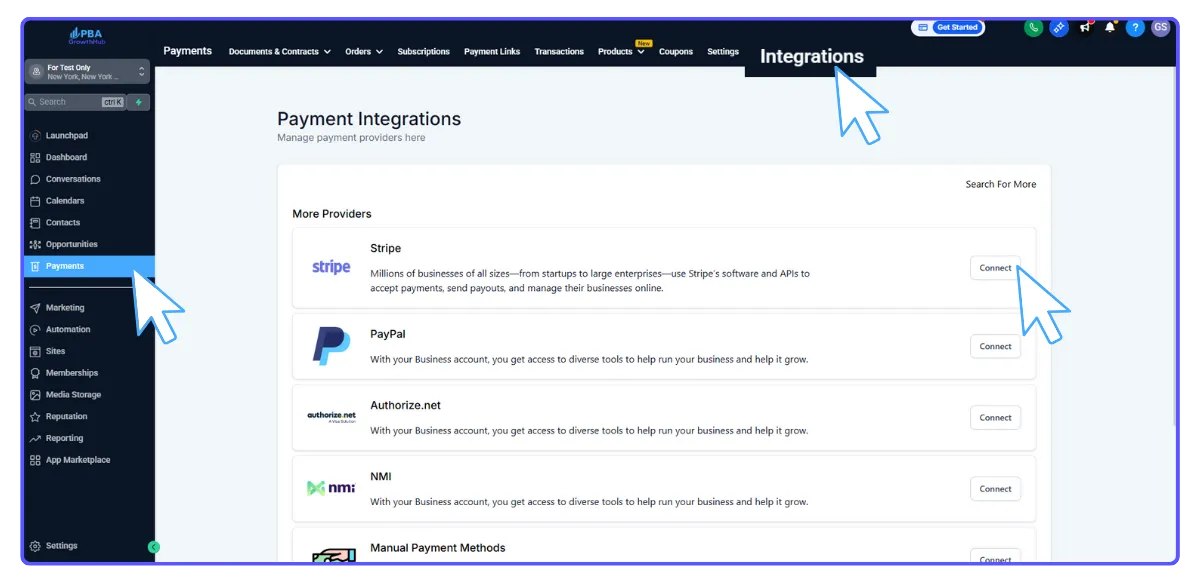
Follow the instructions to log into your Stripe account and finalize the connection.
Once connected, you'll see a "Disconnect" option if you ever need to remove or change the integration.

Step 3: Creating Products in your Stripe Account
To sell items through your sales funnels (refer to other guides for funnel setup), you must first create those products in your Stripe account. Specifically, you only need to create Subscription and Payment Plan products in Stripe before using them in your funnel.
In your Stripe account, navigate to the "Billing" menu and select "Products."
Click "+ New" to add a new product. Give your product a name, then click "Create Product."
Now, you can customize the pricing, set how often it bills (e.g., one-time, monthly), and other details.
Click "Add Pricing Plan" to save your product. It's now ready to be linked to your sales funnel!
Step 4: Bring Products from Stripe into Your Platform
Go to "Payments," then "Products" in your platform.
Click "Import from Stripe."

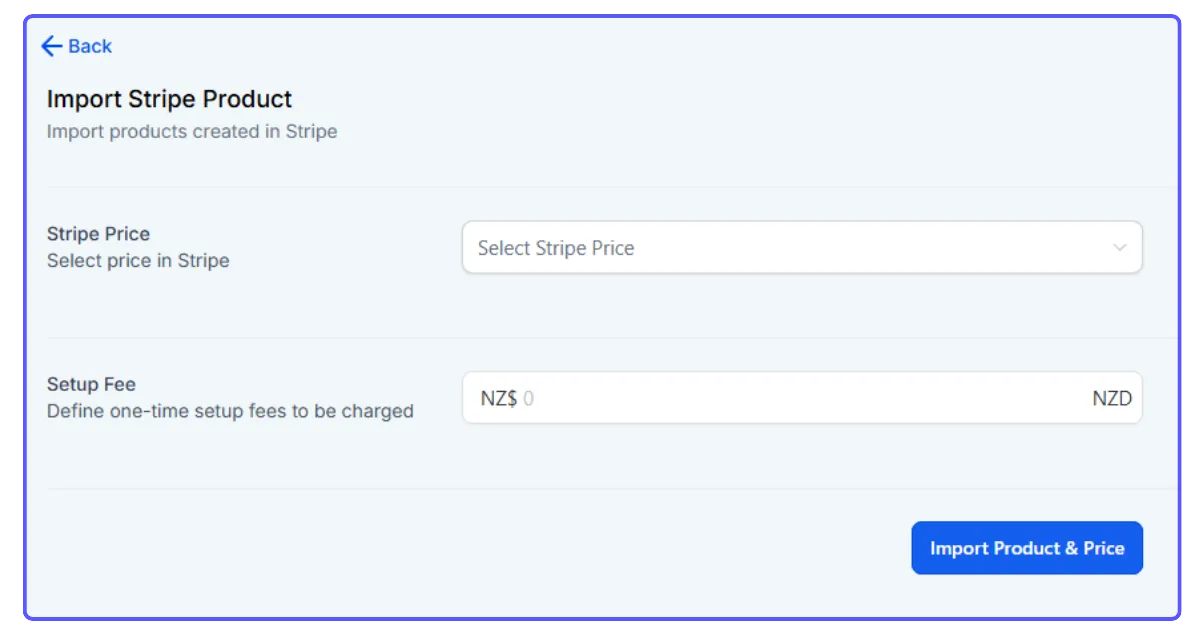
Choose the Stripe product you want to import and add a setup fee if required.
Click "Import Product & Price" to complete the process
How to Integrate a Stripe Account
Step 1: Set Up Your Stripe Account
To begin, you'll need an active Stripe account. Either create a new one or sign in to your existing account if you already have one.
Step 2: Link Your Stripe Account
Go to the "Payments" section, then choose "Integrations."
Click "Connect with Stripe." This will take you to a setup page.
Follow the instructions to log into your Stripe account and finalize the connection.
Once connected, you'll see a "Disconnect" option if you ever need to remove or change the integration.
Step 3: Creating Products in your Stripe Account
To sell items through your sales funnels (refer to other guides for funnel setup), you must first create those products in your Stripe account. Specifically, you only need to create Subscription and Payment Plan products in Stripe before using them in your funnel.
In your Stripe account, navigate to the "Billing" menu and select "Products."
Click "+ New" to add a new product. Give your product a name, then click "Create Product."
Now, you can customize the pricing, set how often it bills (e.g., one-time, monthly), and other details.
Click "Add Pricing Plan" to save your product. It's now ready to be linked to your sales funnel!
Step 4: Bring Products from Stripe into Your Platform
Go to "Payments," then "Products" in your platform.
Click "Import from Stripe."
Choose the Stripe product you want to import and add a setup fee if required.
Click "Import Product & Price" to complete the process