
Welcome to GrowhtHub Knowledge Base Hub
Welcome to GrowhtHub Knowledge Base Hub
Email Best Practices
Now that your new sending domain is set up, it is critical to position yourself for successful inbox placement — not the spam folder. Before sending emails, ensure you follow these essential best practices
1. Set Up a Dedicated Email Sending Domain
What is it?
Your Sending Domain determines how emails are routed across the internet.
Instead of using a shared domain, a dedicated email domain is a private domain used exclusively for your email sending.
Within GrowthHub, when using its native email service, you can create your own dedicated domain. If you are using a custom SMTP provider, this may need to be configured externally.
Why it matters
Without a dedicated sending domain, your emails are far more likely to land in spam — even if your practices are correct.
A dedicated domain gives you:
Full control over your sender reputation
Better deliverability
Higher chances of landing in the inbox
How to set it up
If you haven’t already, it is highly recommended to create your own dedicated sending domain. Follow the step-by-step setup guide available in GrowthHub.
Already have one but emails go to spam?
If this applies to you, refer to the spam troubleshooting guide for deeper fixes.
2. Set Up a Dedicated Sending IP Address
What is it?
A Dedicated IP Address allows your emails to be sent from an exclusive IP — not shared with other users.
Email providers evaluate IP reputation to determine deliverability.
Why it matters
When using shared IPs, your deliverability can be affected by others’ behavior.
A dedicated IP gives you:
Full control of your email reputation
Better deliverability for high-volume sending
Best for:
Businesses sending 200,000+ emails per week
Cost
Businesses sending 200,000+ emails per week
$59/month per IP
Charged to the agency billing account (can be rebilled to clients)
3. Enable Email Validation
What is it?
Email validation checks whether an email address is valid before sending.
Why it matters
Sending to invalid emails:
Damages your domain reputation
Increases bounce rates
Hurts deliverability
How to enable it
Account Level:
Go to Account View → Business Profile
Enable: Verify Email Address when first email is sent
Cost
$2.50 per 1,000 validations
More affordable than most providers
4. Add Your DMARC Record
What is it?
A DMARC record tells receiving servers how to handle your emails.
It works with:
SPF
DKIM
Why it matters
Without DMARC:
Emails may go to spam
Domain reputation drops
How to set it up
Add a TXT record in your DNS:
Type: TXT
Name: _dmarc
Value: v=DMARC1; p=reject
5. Use the Proper “From Email”
What is it?
The “From Email” is what recipients see as the sender.
Why it matters
Mismatch between your sending domain and “From Email” can hurt deliverability.
Best practices
Use the same domain as your sending domain
If using a subdomain, both are valid:
❌ Avoid:
Using a completely different domain
6. Add Unsubscribe Links
What is it?
An unsubscribe link allows users to opt out of your emails.
Why it matters
Not including this will:
Severely damage deliverability
Increase spam complaints
How to set it up
Use the Footer element in GrowthHub’s email builder
Use default or custom unsubscribe links
7. Use Double Opt-In
What is it?
Users confirm their subscription twice:
Fill out form
Verify email via link
Why it matters
Improves engagement
Strengthens domain reputation
Ensures audience actually wants your emails
How to set it up
Create a Double Opt-In workflow inside GrowthHub
8. Stop Sending to Unengaged Emails
What is it?
Avoid sending to users who:
Don’t open
Don’t click
Why it matters
Low engagement = higher spam risk
Best practice
Reduce frequency
Eventually stop sending
It’s better to stop sending than:
Get unsubscribed
Get marked as spam
9. Send Regularly — But Not Too Much
What is it?
Sending frequency impacts your reputation.
Don’t open
Don’t click
Why it matters
Too little → weak reputation
Too much → spam triggers
Recommended strategy
First 5 days: daily emails
Next phase: 2–3 emails per week
No engagement: shift to weekly
Long-term inactive: stop sending
Email Warm-Up
New domains are often flagged as spam initially.
To avoid this:
Follow best practices
Gradually increase volume
Email Sending Recommendations
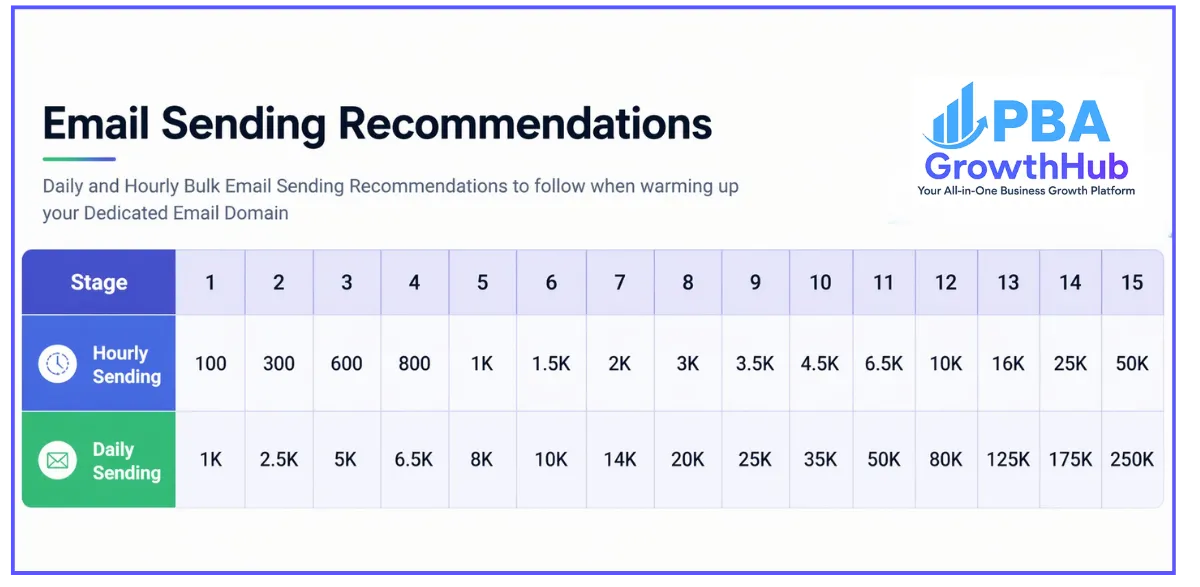
Example progression:
Stage 1:
100 emails/hour
1,000/day
Stage 2:
300 emails/hour
2,500/day
Key reminder
Progress depends on:
Sending behavior
Engagement
Reputation
Pro Tips for Warm-Up
Send to opted-in users only
Start slow
Keep emails short
Avoid link shorteners (bit.ly, etc.)
Avoid cold emailing early
Email Tools
Copy test email
Send from GrowthHub
Check score
Optimize content
Blacklists
Missing records
Domain issues
3. Google Postmaster Tools
Monitor:
Domain age (needs ~4 weeks warm-up)
MX records
DMARC setup
Still stuck?
Contact GrowthHub Support
Frequently Asked Questions
Cold Email Outreach
Not recommended for new domains.
If needed:
Validate emails
Use separate domain
Send slowly
If emails still go to spam
Sometimes it’s better to:
👉 Create a new subdomain instead of fixing the old one
If IP is blacklisted
Contact support immediately
Should domains be shared?
❌ No — each sub-account should have its own domain
What is Email Warm-Up?
Gradually increasing sending volume to build trust
What is Email Deliverability?
Your ability to land in inbox (not spam)
What is Domain Reputation?
Your trust score with email providers
How long to warm up a domain?
~4 weeks
What happens if you send too much?
Damaged reputation
Possible blacklist
GrowthHub Email vs Custom SMTP
GrowthHub: built-in optimization
SMTP: manual setup + limited support
What is a Dedicated Domain?
A private domain for sending emails — improves control and deliverability
What is an Email Bounce?
Hard Bounce: Invalid email
Soft Bounce: Temporary issue
Email Best Practices
Now that your new sending domain is set up, it is critical to position yourself for successful inbox placement — not the spam folder. Before sending emails, ensure you follow these essential best practices.

1. Set Up a Dedicated Email Sending Domain
What is it?
Your Sending Domain determines how emails are routed across the internet.
Instead of using a shared domain, a dedicated email domain is a private domain used exclusively for your email sending.
Within GrowthHub, when using its native email service, you can create your own dedicated domain. If you are using a custom SMTP provider, this may need to be configured externally.
Why it matters
Without a dedicated sending domain, your emails are far more likely to land in spam — even if your practices are correct.
A dedicated domain gives you:
Full control over your sender reputation
Better deliverability
Higher chances of landing in the inbox
How to set it up
If you haven’t already, it is highly recommended to create your own dedicated sending domain. Follow the step-by-step setup guide available in GrowthHub.
Already have one but emails go to spam?
If this applies to you, refer to the spam troubleshooting guide for deeper fixes.
2. Set Up a Dedicated Sending IP Address
What is it?
A Dedicated IP Address allows your emails to be sent from an exclusive IP — not shared with other users.
Email providers evaluate IP reputation to determine deliverability.
Why it matters
When using shared IPs, your deliverability can be affected by others’ behavior.
A dedicated IP gives you:
Full control of your email reputation
Better deliverability for high-volume sending
Best for:
Businesses sending 200,000+ emails per week
Cost
Businesses sending 200,000+ emails per week
$59/month per IP
Charged to the agency billing account (can be rebilled to clients)
3. Enable Email Validation
What is it?
Email validation checks whether an email address is valid before sending.
Why it matters
Sending to invalid emails:
Damages your domain reputation
Increases bounce rates
Hurts deliverability
How to enable it
Account Level:
Go to Account View → Business Profile
Enable: Verify Email Address when first email is sent
Cost
$2.50 per 1,000 validations
More affordable than most providers
4. Add Your DMARC Record
What is it?
A DMARC record tells receiving servers how to handle your emails.
It works with:
SPF
DKIM
Why it matters
Without DMARC:
Emails may go to spam
Domain reputation drops
How to set it up
Add a TXT record in your DNS:
Type: TXT
Name: _dmarc
Value: v=DMARC1; p=reject
5. Use the Proper “From Email”
What is it?
The “From Email” is what recipients see as the sender.
Why it matters
Mismatch between your sending domain and “From Email” can hurt deliverability.
Best practices
Use the same domain as your sending domain
If using a subdomain, both are valid:
❌ Avoid:
Using a completely different domain
6. Add Unsubscribe Links
What is it?
An unsubscribe link allows users to opt out of your emails.
Why it matters
Not including this will:
Severely damage deliverability
Increase spam complaints
How to set it up
Use the Footer element in GrowthHub’s email builder
Use default or custom unsubscribe links
7. Use Double Opt-In
What is it?
Users confirm their subscription twice:
Fill out form
Verify email via link
Why it matters
Improves engagement
Strengthens domain reputation
Ensures audience actually wants your emails
How to set it up
Create a Double Opt-In workflow inside GrowthHub
8. Stop Sending to Unengaged Emails
What is it?
Avoid sending to users who:
Don’t open
Don’t click
Why it matters
Low engagement = higher spam risk
Best practice
Reduce frequency
Eventually stop sending
It’s better to stop sending than:
Get unsubscribed
Get marked as spam
9. Send Regularly — But Not Too Much
What is it?
Sending frequency impacts your reputation.
Don’t open
Don’t click
Why it matters
Too little → weak reputation
Too much → spam triggers
Recommended strategy
First 5 days: daily emails
Next phase: 2–3 emails per week
No engagement: shift to weekly
Long-term inactive: stop sending
Email Warm-Up
New domains are often flagged as spam initially.
To avoid this:
Follow best practices
Gradually increase volume
Email Sending Recommendations
Example progression:
Stage 1:
100 emails/hour
1,000/day
Stage 2:
300 emails/hour
2,500/day
Key reminder
Progress depends on:
Sending behavior
Engagement
Reputation
Pro Tips for Warm-Up
Send to opted-in users only
Start slow
Keep emails short
Avoid link shorteners (bit.ly, etc.)
Avoid cold emailing early
Email Tools
Copy test email
Send from GrowthHub
Check score
Optimize content
Blacklists
Missing records
Domain issues
3. Google Postmaster Tools
Monitor:
Domain age (needs ~4 weeks warm-up)
MX records
DMARC setup
Still stuck?
Contact GrowthHub Support
Frequently Asked Questions
Cold Email Outreach
Not recommended for new domains.
If needed:
Validate emails
Use separate domain
Send slowly
If emails still go to spam
Sometimes it’s better to:
👉 Create a new subdomain instead of fixing the old one
If IP is blacklisted
Contact support immediately
Should domains be shared?
❌ No — each sub-account should have its own domain
What is Email Warm-Up?
Gradually increasing sending volume to build trust
What is Email Deliverability?
Your ability to land in inbox (not spam)
What is Domain Reputation?
Your trust score with email providers
How long to warm up a domain?
~4 weeks
What happens if you send too much?
Damaged reputation
Possible blacklist
GrowthHub Email vs Custom SMTP
GrowthHub: built-in optimization
SMTP: manual setup + limited support
What is a Dedicated Domain?
A private domain for sending emails — improves control and deliverability
What is an Email Bounce?
Hard Bounce: Invalid email
Soft Bounce: Temporary issue